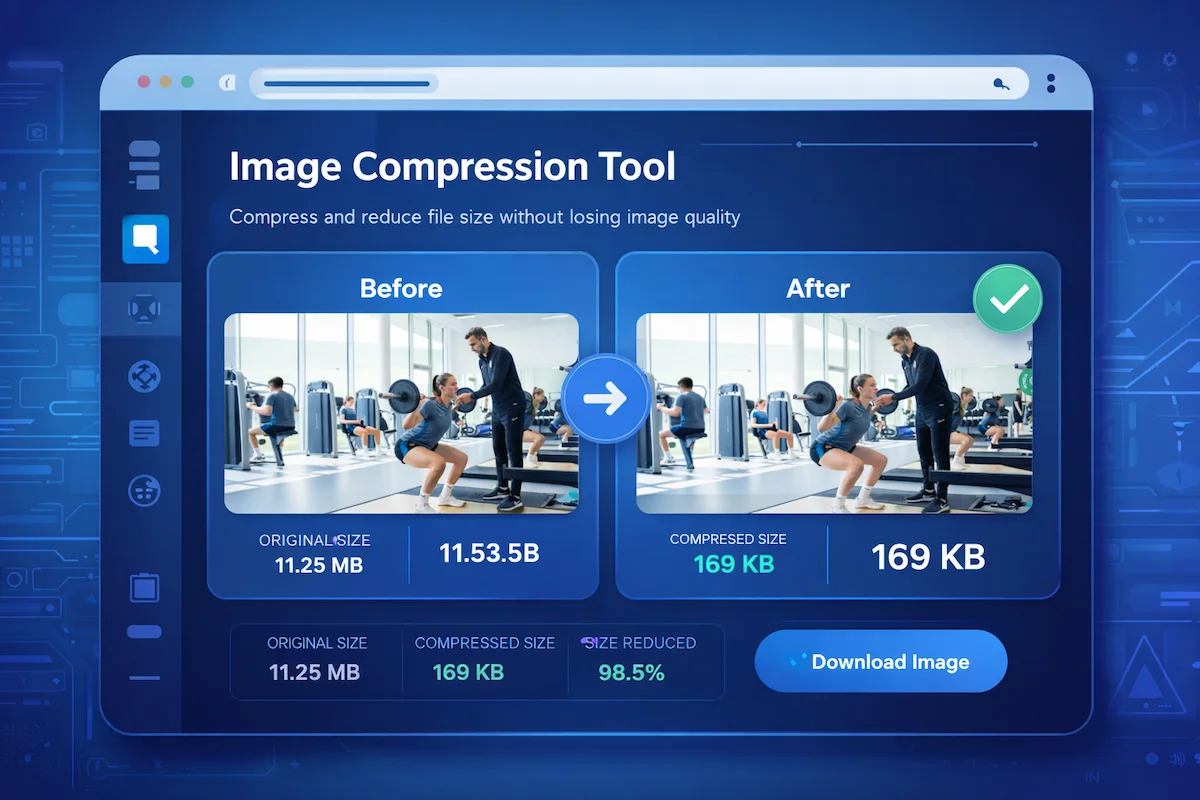
Images are an important part of websites, blogs, and online stores. They help make content more engaging and visually appealing. However, large image files can slow down your website and negatively affect SEO performance.
Learning how to compress images online without losing quality helps improve page speed, enhance user experience, and increase search engine rankings.
Free Image Compressor Tool
You can easily reduce image size using a reliable online tool.
🔗 Image Compressor Tool
https://masterwebtool.com/image-compressor/
This tool allows you to compress images quickly while maintaining good visual quality.
What Is Image Compression?
Image compression is the process of reducing the file size of an image while maintaining acceptable visual quality.
Smaller image files help websites load faster, use less bandwidth, and improve overall performance. Faster websites also provide a better experience for visitors and can improve search engine rankings.
To learn more about how image compression works, read:
Understanding Image Compression Techniques
Why Image Compression Is Important
Image compression plays a major role in improving website performance.
Key benefits include:
- Faster website loading speed
- Better user experience
- Improved SEO rankings
- Reduced bandwidth usage
- Faster loading for mobile users
For more details, read:
Benefits of Image Compression for Websites
How to Compress Images Online
Compressing images online is simple and only takes a few seconds.
Follow these steps:
- Upload your image to an image compression tool.
- Select the compression level or quality settings.
- Download the optimized image.
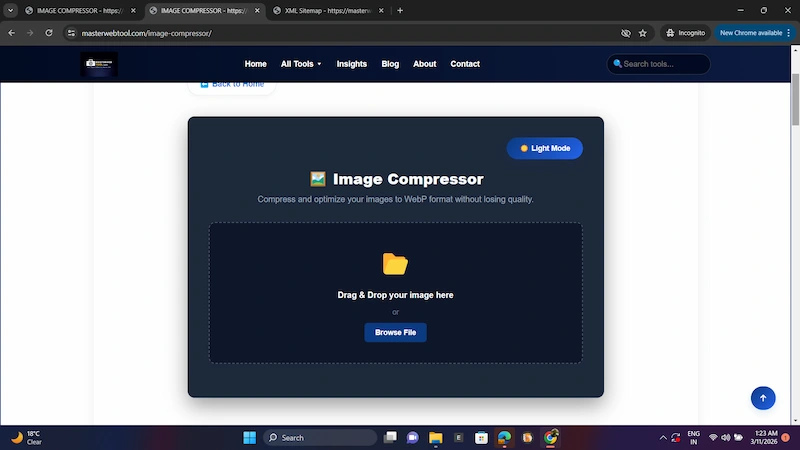
Step 1: Upload Your Image
Start by uploading the image you want to compress. Most online tools support formats such as JPG, PNG, and WebP.
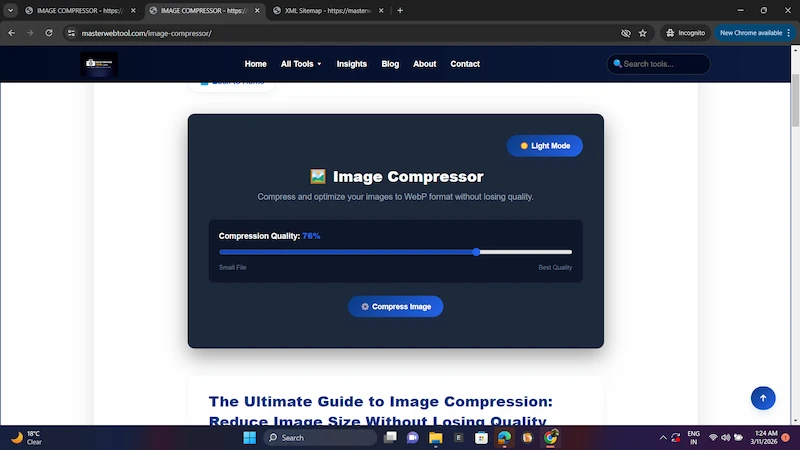
Step 2: Compress the Image
After uploading the image, the tool automatically reduces the file size using smart compression algorithms while maintaining visual quality.
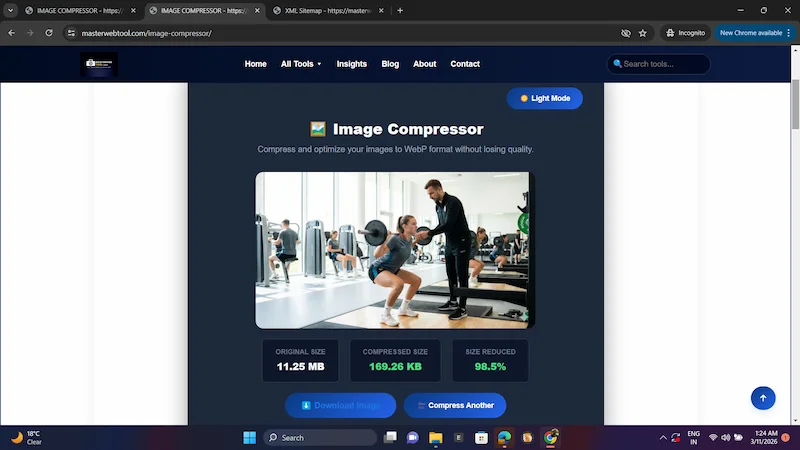
Step 3: Download the Compressed Image
Once the compression process is finished, simply download the optimized image and use it on your website or blog.
Best Image Formats for Compression
Different image formats provide different benefits when it comes to compression.
Common formats include:
JPEG – Best for photographs and large images
PNG – Best for graphics and images with transparency
WebP – A modern format with excellent compression for websites
Learn more here:
PNG vs WebP Image Format Comparison
Compress Images to Specific File Sizes
Some websites or online forms require images to be uploaded within a specific size limit, such as:
- 100KB
- 200KB
In these cases, tools that compress images to exact file sizes are very useful.
Learn more here:
Image Optimization Tips for Faster Websites
Here are some useful tips to improve website performance through image optimization:
- Resize images before uploading
- Convert images to WebP format
- Enable lazy loading
- Compress images before publishing
- Avoid uploading large unoptimized images
More strategies can be found here:
Image Optimization Tips for Faster Websites
Common Image Compression Mistakes
When compressing images, it is important to avoid common mistakes such as:
- Over-compressing images
- Using the wrong image format
- Uploading unnecessarily large images
You can learn more here:
Common Image Compression Mistakes
Future of Image Compression Technology
Image compression technology continues to evolve. Modern formats like WebP and AVIF provide better compression and improved performance compared to older formats.
In addition, AI-powered optimization tools are making image compression faster and more automated.
Explore future trends here:
Future Trends in Image Compression Technology
FAQs
How can I compress images without losing quality?
You can use reliable online image compression tools that balance file size and visual quality using advanced algorithms.
What is the best image compressor?
Some popular tools include:
- TinyPNG
- Squoosh
- MasterWebTool Image Compressor
Does compressing images reduce quality?
If compression is done correctly, the quality loss is usually minimal and not noticeable.
Conclusion
Image compression is essential for improving website speed, SEO performance, and user experience. By using the right tools and formats, you can significantly reduce image file size while maintaining good visual quality.
You can also explore more tools here:
How to Compress Images Online Without Losing Quality
Images are essential for websites, blogs, and online stores. However, large images can slow down your website and reduce SEO performance. Learning how to compress images online without losing quality helps improve page speed and user experience.
Free Image Compressor Tool
Reduce image size instantly without losing quality.
Use Image Compressor ToolWhat Is Image Compression?
Image compression is the process of reducing the file size of an image while maintaining visual quality. Smaller image files help websites load faster and improve search engine rankings.
To learn more, read Understanding Image Compression Techniques.
Why Image Compression Is Important
- Improves website loading speed
- Enhances user experience
- Boosts SEO rankings
- Reduces bandwidth usage
Learn more in Benefits of Image Compression for Websites.
How to Compress Images Online
- Upload your image.
- Select compression settings.
- Download the optimized image.
See the full tutorial in Step-by-Step Guide to Compress Images Online.
Image Compression Tool Example
Best Image Formats for Compression
- JPEG – best for photos
- PNG – best for graphics
- WebP – best for modern websites
Learn more in PNG vs WebP Image Format Comparison.
Compress Images to Specific File Sizes
Sometimes images must be compressed to specific sizes like 100KB or 200KB for websites or forms.
Learn how in Compress Images to 100KB.
Image Optimization Tips
- Resize images before uploading
- Use WebP format
- Enable lazy loading
- Compress images before publishing
More tips in Image Optimization Tips for Faster Websites.
Common Image Compression Mistakes
Avoid over-compressing images, using wrong formats, and uploading unoptimized images.
Learn more in Common Image Compression Mistakes.
Future of Image Compression
Modern formats like WebP and AVIF are improving image compression efficiency.
Explore Future Trends in Image Compression Technology.
FAQs
How can I compress images without losing quality?
Use reliable online compression tools that balance quality and file size.
What is the best image compressor?
Tools like TinyPNG, Squoosh, and MasterWebTool Image Compressor are popular options.
Does compressing images reduce quality?
If done properly, the quality loss is minimal.
Conclusion
Image compression is essential for improving website speed and SEO. Using the right tools and formats helps reduce image size while maintaining visual quality.
You can also explore Free Image Optimization Tools to further optimize your website images.
